Google Ads Management for E-commerce
Google Ads for E-commerce Brands
Shopping, Performance Max and Search built to grow sales at a ROAS you can live with
For an online store, Google Ads is about selling the right products at a profitable return, not about traffic. I manage Shopping and Performance Max campaigns, fix the product feed in Merchant Center, and make sure purchase tracking is accurate so Smart Bidding is learning from real revenue.
- Products segmented by margin and performance so budget follows profit
- Merchant Center feed optimization: titles, attributes, custom labels, disapprovals
- Purchase tracking verified once, correctly, with enhanced conversions

Google Ads for e-commerce has to answer one question first: which products are profitable to advertise? My e-commerce PPC management combines Shopping, Performance Max, Search and feed optimization to grow sales while protecting your target ROAS. As a Google Ads e-commerce expert, I focus on margin and new customers, not just revenue.
Why Google Ads underperforms for e-commerce brands
These are the problems I see most often when auditing accounts in this industry.
One Performance Max campaign for everything
A single all-products campaign lets a few best-sellers absorb the budget while the rest of the catalog never gets a chance. Low-margin products can also quietly take over spend.
A weak product feed
Poor titles, missing attributes, wrong product types and disapprovals limit how often your products show and how relevant they look to Google.
Inaccurate purchase tracking
Duplicate purchase events, missing values, or tags that fire on page refresh make ROAS numbers wrong and send Smart Bidding in the wrong direction.
Brand traffic hiding real performance
When brand searches are mixed with everything else, the blended ROAS looks great while new-customer acquisition is actually unprofitable.
Rising costs and thin margins
E-commerce CPCs keep climbing. Without margin-aware bidding and segmentation, growth in revenue can mean a loss in profit.
My Google Ads strategy for e-commerce
How campaigns are researched, built and optimized for this industry.
Keyword and product research
I map your catalog by margin, price point, seasonality and search demand, then identify which products deserve their own Search campaigns and which belong in Shopping or Performance Max.
Shopping and Performance Max
Standard Shopping gives control over individual products and bids. Performance Max gives scale across Shopping, Search, YouTube and Display. I use both, with a structure that keeps each one accountable.
Campaign structure
Campaigns are segmented by margin tier, category or performance using custom labels. Brand and non-brand Search are separated so you see true acquisition cost.
Ad copy and creative
Search ads highlight free shipping, returns, guarantees and unique selling points. Performance Max asset groups are built per product category with matching images, videos and headlines.
Location targeting
Targeting matches where you ship and where margins hold up. States or regions with high return rates or expensive shipping are bid down or excluded.
Negative keywords and brand exclusions
Negative lists remove free, used, DIY, wholesale and unrelated searches. Brand exclusions in Performance Max keep it from taking credit for brand demand.
Budget and bidding
Target ROAS is set per campaign based on margin, not one blended number. New campaigns start with Maximize Conversion Value and move to tROAS once there are enough purchases.
Search term and placement optimization
Weekly reviews of Shopping and Search terms, Performance Max search categories and placements keep spend on queries that convert.
Landing page and checkout optimization
Product and collection pages are reviewed for speed, trust signals, pricing clarity and checkout friction. Small conversion rate gains compound across every campaign.
Example campaign structure
A realistic starting structure based on how customers in this industry search. Match types shown as [exact], "phrase" and broad.
Performance Max - Hero Products
Goal: Scale best-selling, high-margin products
Ad group: Asset group: Category A
Listing group: custom_label_0 = heroAudience signals: past purchasers, in-marketPerformance Max - Catalog
Goal: Coverage for the rest of the catalog at a controlled ROAS
Ad group: Asset group by category
Listing group: all products except hero and low marginStandard Shopping - Low Margin
Goal: Control bids on products that cannot afford high CPCs
Ad group: Low Margin Products
Product group: custom_label_1 = low margin, low max CPCSearch - Non-Brand Category
Goal: New customer acquisition on category searches
Ad group: Category Keywords
"buy [product category] online"[best [product category]]"[product category] free shipping"Search - Brand
Goal: Protect brand demand at low cost
Ad group: Brand
[your brand]"[your brand] discount code""[your brand] reviews"
Location targeting
E-commerce targeting is about profitability by region, not just where you can ship.
- Target the countries and states you ship to, and exclude regions where shipping costs or return rates make orders unprofitable.
- Use location bid adjustments based on conversion rate and average order value by state or region.
- Match currency, shipping and tax settings in Merchant Center to the markets you target.
- For stores with physical locations, add local inventory ads and store visit goals.
- Review geographic reports monthly to catch regions quietly absorbing spend without sales.
Google Ads services for e-commerce brands
Everything needed to run the account properly, from the first audit to monthly reporting.
Google Ads Audit
Find out where your Google Ads budget is going and what to fix first
Google Ads Management
Done-for-you Google Ads management from a certified specialist, not an agency account queue
Google Search Ads
Search campaigns built on the searches that mean someone is ready to buy
Google Ads Conversion Tracking
Conversion tracking you can trust, so every bidding decision is based on real leads and sales
Google Tag Manager Consulting
A clean, documented GTM setup for every tag your marketing depends on
Looker Studio Reporting
One dashboard that shows spend, leads, sales and cost per result, updated automatically
Conversion and lead-quality tracking
I set up purchase tracking through Google Tag Manager with a proper data layer on Shopify, WooCommerce or your platform, including transaction ID deduplication and enhanced conversions. GA4 e-commerce events give a full funnel view. Where it helps, server-side tracking improves data accuracy after browser restrictions. New-customer acquisition goals and customer lifetime value data can then be used so bidding favors profitable new customers rather than repeat brand purchases.
The journey we measure
- 1Google Ads click (Shopping, Performance Max or Search)
- 2Product page view and add to cart
- 3Checkout started
- 4Purchase with order value
- 5Repeat purchase and customer lifetime value
Verified Google Ads results
Google Ads results for e-commerce brands
Case studies from real Google Ads campaigns I manage, with verified before and after results on each page.
 E-commerce
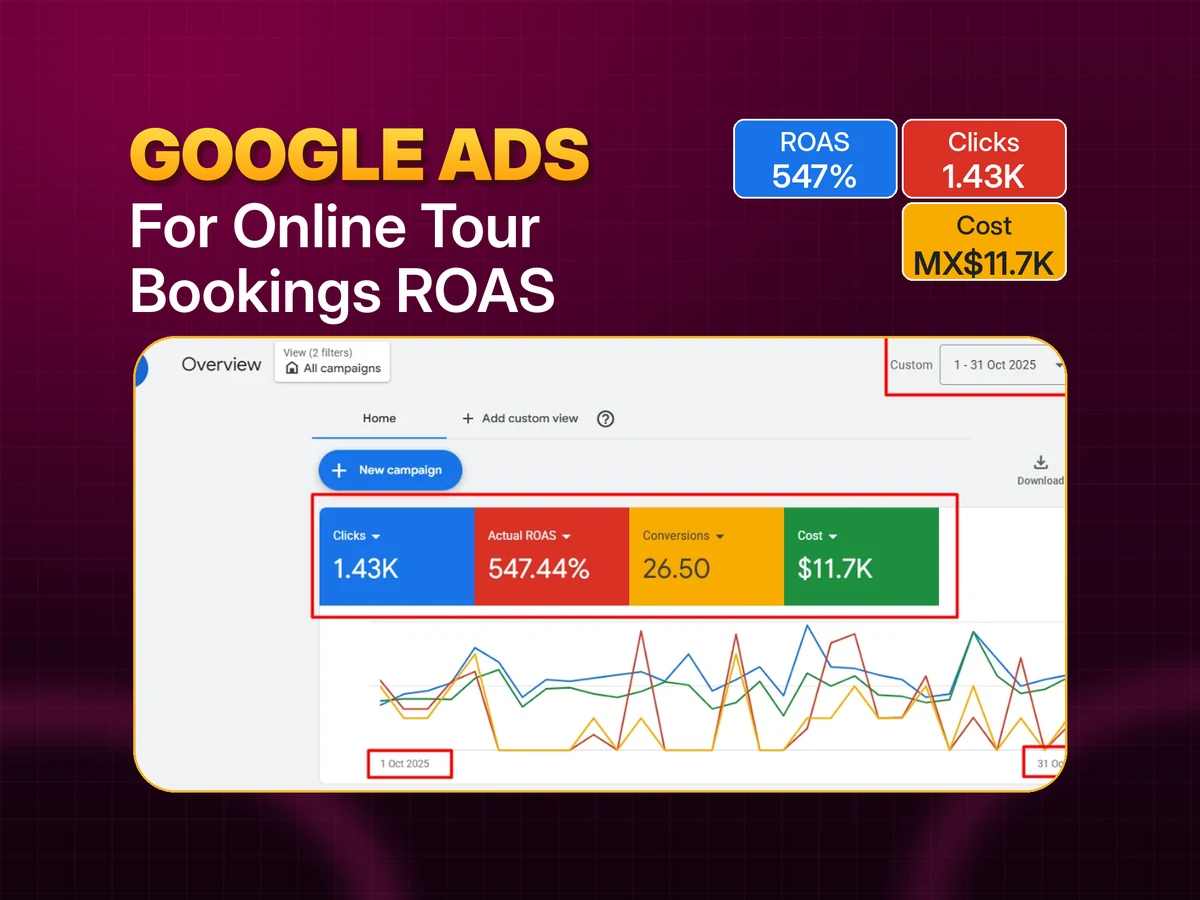
How I Increased ROAS From 166% to 547% for a Tour Booking Business With Google Ads
Restructured campaigns and bidding around purchase value. ROAS rose from 166% to 547% while ad spend fell 54%.
547%
ROAS (from 166%)
-54%
Ad spend
+51%
Revenue from ads
 E-commerce
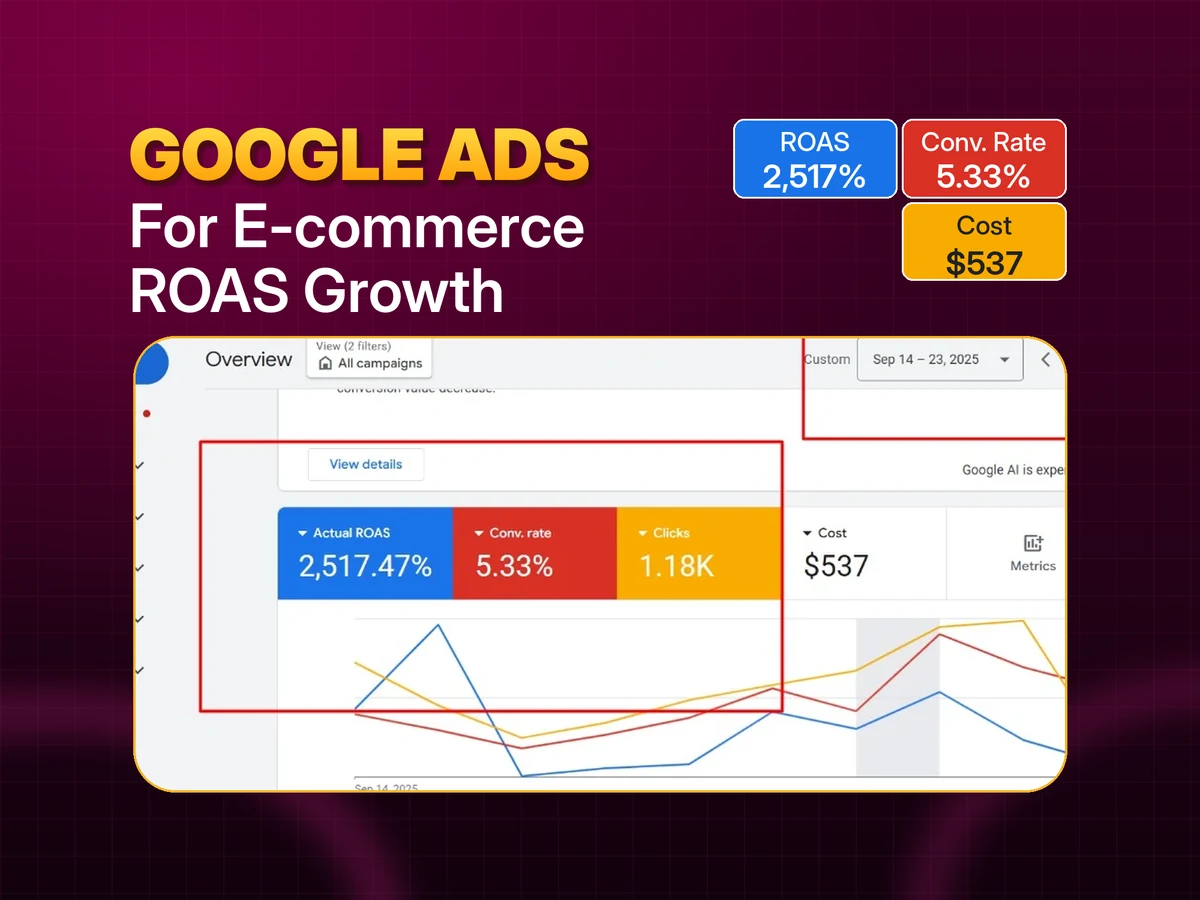
How I Raised an E-commerce Store’s ROAS to 2,517% With Google Ads
Refined keywords, audiences and bidding for an already profitable store. ROAS rose from 1,712% to 2,517% and conversion rate from 4.50% to 5.33%.
2,517%
ROAS (from 1,712%)
5.33%
Conversion rate (from 4.50%)
-44%
Daily ad spend
How we work together
From the first audit to ongoing management and reporting.
Free audit and strategy call
I review your account (or your market, if you are starting fresh), your website and your tracking, then walk you through what I would change and why.
Tracking setup
Calls, forms, bookings or purchases are tracked through Google Tag Manager and GA4 before scaling spend, with offline conversions connected where you have a CRM.
Campaign build or restructure
Campaigns, ad groups, keywords, ads, assets, negatives and location settings built in your own account.
Launch and daily checks
Close monitoring in the first two weeks to catch wasted search terms and tracking issues early.
Weekly optimization
Search terms, bids, budgets, ads and landing pages reviewed and adjusted every week.
Monthly reporting
A Looker Studio dashboard with spend, leads or sales and cost per result, plus a short summary of what changed and what is next.
Google Ads for e-commerce: frequently asked questions
Is Performance Max or Standard Shopping better for my store?
It depends on your catalog, margins and data. Many stores use Performance Max for scale and Standard Shopping for control over specific products or low-margin items. I decide based on your account data, not a default preference.
What ROAS should I target?
The target comes from your margins, not from an industry average. I calculate break-even ROAS per product tier and set campaign targets above it so growth is profitable.
Do you work with Shopify and WooCommerce?
Yes. I set up and audit purchase tracking on both, including data layer events, enhanced conversions and server-side tracking where needed.
Can you fix Merchant Center disapprovals?
Yes. I review feed errors, policy issues and account warnings and resolve them so products can show again. Feed quality is usually the fastest win in e-commerce accounts.
How much budget does an e-commerce store need?
Enough to generate a meaningful number of purchases per month, because Smart Bidding needs conversion data to work. The right figure depends on your average order value and conversion rate, which I review in the free audit.
How do you separate brand and non-brand performance?
With separate brand Search campaigns and brand exclusions in Performance Max, so you can see the real cost of acquiring new customers.
Do you handle YouTube and Display for e-commerce?
Yes, mainly as remarketing and as part of Performance Max. Standalone video and Display campaigns are added when the account has the data and creative to support them.
How quickly will sales improve?
Feed and tracking fixes often show results within weeks. Bidding and structure changes need 4 to 8 weeks of data to settle, especially after moving to target ROAS.
Related services
Other industries I work with
See all industries, browse case studies or read the Google Ads blog.
Get a free e-commerce Google Ads audit
I will review your campaign structure, product feed, purchase tracking and ROAS by product tier and show you where profit is leaking.
Get In Touch
Let's Grow Your Business
Ready to scale? Send me a message and let's discuss your marketing goals.